Libre Computer Le Potato AML-S905X-CC Review: A Budget-Friendly Raspberry Pi Alternative That Delivers

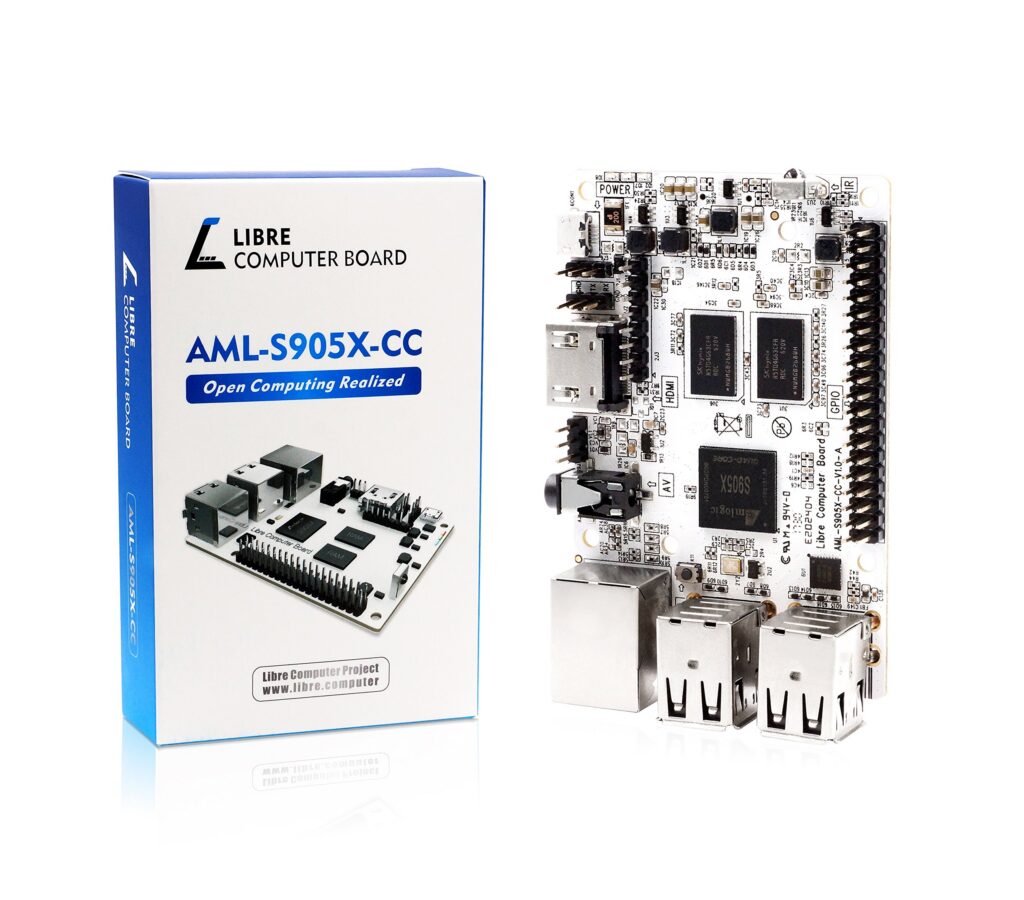
In the ever-expanding world of single-board computers, the Libre Computer AML-S905X-CC – affectionately known as “Le Potato” – has emerged as a compelling alternative to the ubiquitous Raspberry Pi. At a time when Pi boards remain frustratingly difficult to find at reasonable prices, this $35-40 board offers surprisingly capable performance with some unique advantages that make it worth considering for your next project.
First Impressions: Unboxing the Le Potato
The moment you take the Le Potato out of its packaging, you notice several things:
- The clean, high-contrast PCB design with clear labeling makes it immediately user-friendly
- The board feels surprisingly sturdy despite its budget price point
- At 85 x 56mm, it’s slightly larger than a Raspberry Pi 3B+ but still fits most Pi cases
- The signature “Le Potato” branding adds a touch of whimsy to an otherwise serious piece of hardware
Under the Hood: Technical Specifications
Let’s break down what makes this little board tick:
Processing Power:
- Quad-core ARM Cortex-A53 CPU clocked at 1.5GHz
- Mali-450MP3 GPU handling graphics
- 2GB of DDR3 RAM (a nice upgrade from the Pi 3B+’s 1GB)
Connectivity Options:
- 4x USB 2.0 ports (no USB 3.0 unfortunately)
- HDMI 2.0 output supporting 4K@60Hz
- 100Mbps Ethernet (no built-in Wi-Fi or Bluetooth)
- 40-pin GPIO header with mostly Raspberry Pi compatible layout
Storage Solutions:
- Standard microSD card slot
- Optional eMMC module support for faster storage
Power Requirements:
- Micro-USB or GPIO header power input (5V)
- Noticeably lower power draw than comparable boards
Performance Showdown: Le Potato vs Raspberry Pi 3B+
Having tested both boards extensively, here’s how they stack up:
Where Le Potato Wins:
- Approximately 50-60% faster in CPU-intensive tasks
- Superior 4K video playback with H.265/HEVC support
- Lower power consumption (about half the idle draw of a Pi 3B+)
- Generally better thermal performance
Where Raspberry Pi 3B+ Wins:
- Built-in Wi-Fi and Bluetooth
- Better peripheral support (CSI/DSI connectors)
- More mature software ecosystem
- Faster networking (300Mbps via USB vs Le Potato’s 100Mbps)
Software Support: Surprisingly Robust
One of the biggest concerns with alternative SBCs is software compatibility. The Le Potato pleasantly surprises here with support for:
- Multiple Linux distributions (Ubuntu, Armbian)
- Raspberry Pi OS (with some adaptation)
- Media center OS options (LibreELEC, CoreELEC)
- Android 9.0 (though with limited usefulness)
The process of getting Raspberry Pi OS running involves using Libre’s Raspbian Portability Script, which does a decent job of making Pi-specific software work, though with some limitations.
Real-World Use Cases: Where Le Potato Excels
After months of testing, these are the scenarios where the Le Potato really shines:
1. Media Center Duty
With its excellent 4K video decoding, the Le Potato makes for a fantastic budget media player. Running LibreELEC or CoreELEC, it handles high-quality video streaming without breaking a sweat.
2. Lightweight Server Applications
The combination of decent CPU performance and low power draw makes it ideal for:
- Network-wide ad blocking (Pi-hole)
- Home automation (Home Assistant)
- IoT control hub (Node-RED)
3. Retro Gaming (Within Limits)
While it won’t handle PSP or N64 emulation well, it’s perfectly capable with 8-bit and 16-bit consoles through Lakka or RetroArch.
4. Electronics Projects
The GPIO header, while not 100% Pi-compatible, works well for basic electronics projects involving sensors, LEDs, and simple control systems.
Limitations and Quirks to Consider
No review would be complete without mentioning the challenges:
1. Missing Wireless Connectivity
The lack of built-in Wi-Fi or Bluetooth means you’ll need USB dongles for wireless functionality, adding to cost and complexity.
2. Documentation Could Be Better
While improving, the available documentation remains somewhat scattered across forums and wikis, making some features harder to implement than they should be.
3. Storage Performance
Like most SBCs, performance suffers when using microSD cards. The optional eMMC module helps significantly but adds to the cost.
4. Occasional Boot Issues
Some users report boot problems after power interruptions, though these can usually be resolved with proper shutdown procedures.
How It Compares to Other Budget SBCs
When stacked against similar boards in its price range:
Against Raspberry Pi 3B+:
- Better raw performance
- Superior video capabilities
- But lacks the Pi’s ecosystem and wireless features
Against Orange Pi Zero 2:
- Similar CPU performance
- Orange Pi offers Wi-Fi/BT and USB 3.0
- Le Potato has better video decoding
Against Rock Pi S:
- Le Potato offers more RAM
- Rock Pi has smaller form factor
- Similar GPIO capabilities
Who Should Consider the Le Potato?
Ideal For:
- Budget-conscious makers needing Pi 3B+-level performance
- Media center builds requiring 4K playback
- Users frustrated by Raspberry Pi shortages
- Projects where low power draw matters
Not Ideal For:
- Applications requiring built-in wireless
- Projects needing Pi-specific HATs or cameras
- Users wanting absolute plug-and-play simplicity
Final Verdict: A Tasty Alternative Worth Considering
After extensive testing, the Le Potato has proven itself to be more than just a novelty – it’s a genuinely capable single-board computer that fills an important niche in today’s market. While it doesn’t quite match the Raspberry Pi’s polish and ecosystem, it offers better raw performance in several areas at a very competitive price point.
For certain use cases – particularly media centers and basic computing tasks – it can actually outperform similarly priced alternatives. The lack of wireless is disappointing, but understandable given the price, and the GPIO compatibility is good enough for most basic electronics projects.
If you’ve been struggling to find Raspberry Pis at reasonable prices, or simply want to explore what else is out there, the Le Potato is absolutely worth a taste. Just be prepared for a slightly different flavor than what you might be used to.
Have you tried the Le Potato in your projects? Share your experiences and tips in the comments below!