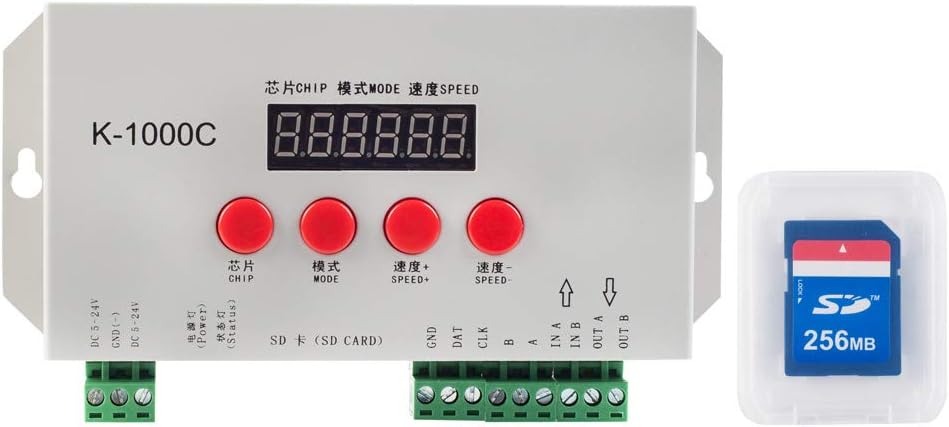
If you’ve ever wanted to create dazzling light displays for your home, stage productions, or commercial spaces, the BTF-LIGHTING K-1000C Pixel LED Controller might be your perfect starting point. This compact yet powerful device opens up a world of possibilities for controlling addressable LEDs, from simple decorative lighting to complex synchronized shows.
First Impressions: What’s in the Box?
Unboxing the K-1000C reveals a surprisingly sturdy metal enclosure that feels more premium than its price tag suggests. The package includes:
- The main controller unit
- A 256MB SD card (preloaded with software and sample effects)
- Basic wiring accessories
The controller’s compact size (about the size of a smartphone) makes it easy to tuck away in most installations, while the metal casing helps with heat dissipation during extended use.
Technical Specifications That Matter
The K-1000C boasts some impressive specs for its class:
- Supports up to 2,048 RGB pixels (or 768 RGBW)
- Works with 5V-24V LED strips
- Handles most popular LED chips including WS2812B, WS2811, and APA102
- Offers a refresh rate up to 30 FPS (depending on pixel count)
- Features SD card storage for lighting programs
Setting Up: Easier Than You Might Think
Getting started with the K-1000C follows a straightforward process:
- Install the included LEDEdit software on a Windows PC
- Design your light sequences or choose from pre-made effects
- Save your configuration to the SD card
- Insert the card into the controller and power up your LED installation
While the setup isn’t complicated, first-time users should note that the software only runs on Windows. The interface, while functional, shows its age with some translations that could be clearer.
Real-World Performance: Where It Shines
In practical use, the K-1000C delivers reliable performance for medium-sized installations. Testing with various LED types revealed:
- Smooth animation playback at up to 1,500 pixels
- Noticeable but acceptable frame rate reduction at maximum capacity
- Excellent color accuracy and brightness control
- Stable operation even during extended 8+ hour runs
The controller particularly excels at:
- Holiday lighting displays
- Architectural accent lighting
- Small-to-medium stage productions
- Permanent art installations
Software Capabilities: Powerful But Quirky
The bundled LEDEdit software offers a robust set of features:
- 22 built-in animation presets
- Custom effect creation tools
- Image/video import for pattern generation
- Precise timing and transition controls
While powerful, the software does show some rough edges:
- Occasionally confusing menu options
- Some untranslated Chinese text in places
- Limited documentation for advanced features
Comparing to Alternatives
When stacked against similar controllers, the K-1000C holds its own:
- More affordable than professional-grade solutions
- Supports more LED types than many competitors
- Offers better cascading support than entry-level models
However, it lacks some modern conveniences like:
- Wireless control options
- Mobile app integration
- Cloud-based programming
Who Should Consider This Controller?
The K-1000C is ideal for:
- DIY enthusiasts ready to step up from basic controllers
- Small businesses needing reliable lighting control
- Event planners creating custom light environments
- Artists incorporating LEDs into installations
It might not be the best fit for:
- Those needing wireless control
- Mac/Linux users unwilling to use Windows
- Complete beginners wanting plug-and-play simplicity
Final Verdict: Great Value With Some Tradeoffs
After extensive testing, the K-1000C emerges as a compelling option in its price range. While it’s not without its quirks, the combination of solid performance, flexible compatibility, and professional features makes it stand out from cheaper alternatives.
For about $40, you’re getting controller capabilities that would have cost hundreds just a few years ago. If you can work within its limitations, the K-1000C offers tremendous creative potential for your lighting projects.
Have you used the K-1000C in your projects? What was your experience? Share your thoughts in the comments below!